
Last updated on
Nov 9, 2026
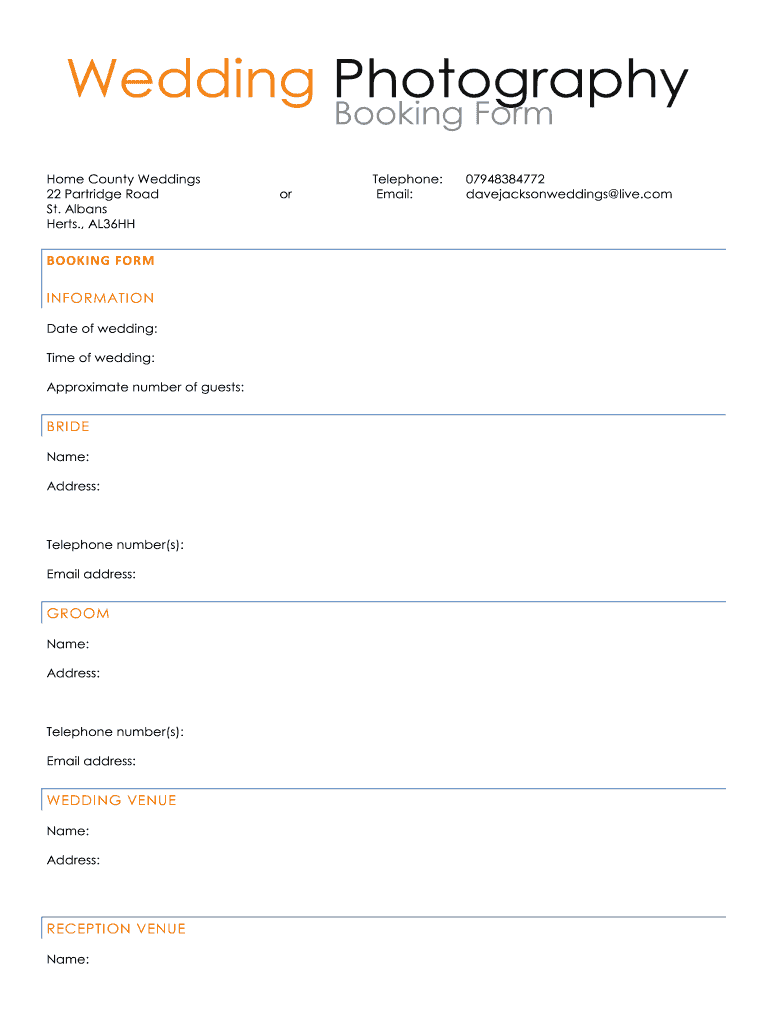
Wedding Photography Booking Form free printable template
We are not affiliated with any brand or entity on this form

Fill out
Complete the form online in a simple drag-and-drop editor.

eSign
Add your legally binding signature or send the form for signing.

Share
Share the form via a link, letting anyone fill it out from any device.

Export
Download, print, email, or move the form to your cloud storage.
Why pdfFiller is the best tool for your documents and forms


End-to-end document management
From editing and signing to collaboration and tracking, pdfFiller has everything you need to get your documents done quickly and efficiently.
Accessible from anywhere
pdfFiller is fully cloud-based. This means you can edit, sign, and share documents from anywhere using your computer, smartphone, or tablet.
Secure and compliant
pdfFiller lets you securely manage documents following global laws like ESIGN, CCPA, and GDPR. It's also HIPAA and SOC 2 compliant.
What is Wedding Photography Booking Form
The Wedding Booking Form is a service agreement used by clients to book wedding photography services with Home County Weddings.
pdfFiller scores top ratings on review platforms




Who needs Wedding Photography Booking Form?
Explore how professionals across industries use pdfFiller.

Wedding Photography Booking Form is needed by:
-
Couples planning their wedding
-
Wedding planners or coordinators
-
Photography service providers
-
Event venues requiring booking details
-
Contractors for wedding services
-
Clients interested in wedding-related agreements
Comprehensive Guide to Wedding Photography Booking Form
What is the Wedding Booking Form?
The Wedding Booking Form serves as a crucial tool for securing wedding photography services. It ensures that clients provide essential information such as the wedding date, time, and venue, enabling photographers to organize their schedules efficiently. This UK wedding form is an effective way to confirm details and outline the agreement between the client and the photographer.
Purpose and Benefits of the Wedding Booking Form
Utilizing the Wedding Booking Form simplifies the process of securing wedding photography services. By completing this form, clients guarantee that all details are accurately captured, which is essential for making informed arrangements. Moreover, it acts as a legal confirmation of the booking, fostering trust and accountability between the client and the service provider.
Key Features of the Wedding Booking Form
The Wedding Booking Form includes several distinctive features that enhance its functionality. Key elements consist of:
-
Required fields for essential information such as names, contact details, and event specifics.
-
Details regarding payment terms and conditions.
-
A clause for a non-refundable booking fee to ensure commitment from clients.
Such features make this photography contract a comprehensive tool for both parties involved.
Who Needs the Wedding Booking Form?
The target audience for the Wedding Booking Form primarily includes engaged couples and wedding planners. Completing this form is particularly important in scenarios where special events are planned, such as large weddings with extensive guest lists. It is vital for ensuring every detail is captured accurately, leading to a smoother event overall.
How to Fill Out the Wedding Booking Form Online (Step-by-Step)
Filling out the Wedding Booking Form online is straightforward. Follow this step-by-step guide to ensure all entries are accurate:
-
Enter the names of the bride and groom in the designated fields.
-
Provide the date and time of the wedding.
-
Specify the venues for both the ceremony and reception.
-
Include the expected number of guests attending the event.
-
Sign and date the form to confirm your agreement with the terms provided.
This comprehensive approach guarantees clarity and prevents mistakes during the booking process.
Review and Validation Checklist for the Wedding Booking Form
To ensure accuracy before submission, clients should review their completed forms using the following checklist:
-
Verify that all required fields are filled in completely.
-
Check for any spelling errors, particularly in names and venues.
-
Confirm that the wedding date and time are correct.
-
Review the payment terms and ensure you understand them.
By taking these precautions, clients can avoid common mistakes that might delay the booking process.
Signing the Wedding Booking Form
Signing the Wedding Booking Form is essential to finalize the agreement. Clients have the option to provide a digital signature or a traditional wet signature. Utilizing platforms like pdfFiller allows for streamlined eSigning, which simplifies the process and ensures all parties have a signed copy for their records. This step legitimizes the wedding service agreement, confirming commitment from both clients and photographers.
Submission Methods and Delivery of the Wedding Booking Form
Once the Wedding Booking Form is completed, clients can submit it through various methods. Common options include direct uploads to service provider portals or emailing the form. It's advisable to ask about submission confirmation and whether there are any tracking capabilities to ensure the form is received and processed in a timely manner.
Security and Compliance for the Wedding Booking Form
When using pdfFiller for handling the Wedding Booking Form, several security measures are in place. The platform employs 256-bit encryption to protect sensitive data and is compliant with HIPAA and GDPR standards. Clients can rest assured that their privacy and data protection are prioritized throughout the process.
Experience Seamless Wedding Photography Booking with pdfFiller
Using pdfFiller to fill out the Wedding Booking Form enhances the user experience significantly. The platform offers tools for editing, sharing, and securely signing documents, making the entire process more efficient and user-friendly. Embracing these online solutions helps users navigate the complexities of wedding planning with ease and confidence.
How to fill out the Wedding Photography Booking Form
-
1.Begin by accessing and opening the Wedding Booking Form on pdfFiller. You can do this by navigating to the pdfFiller website and searching for the form name in the search bar.
-
2.Once the form is open, familiarize yourself with the layout of the document. Look for fillable fields that require your input, ensuring you understand what information is needed in each section.
-
3.Before you begin completing the form, gather all necessary information including your wedding date, time, the number of guests, and details about the bride and groom. Having this information on hand will make the process smoother.
-
4.Navigate through the form using pdfFiller's intuitive interface. Click on each blank field and enter the required information such as the venue names and package details.
-
5.Pay particular attention to fields that require specific formatting, such as dates. Ensure all details are accurate to avoid any issues.
-
6.Once you have filled in all necessary fields, review the form carefully. Check for any typos or missing information, particularly in sections that require signatures or date validations.
-
7.To finalize the process, use the Sign feature on pdfFiller to sign and date the form. This demonstrates your agreement to the terms laid out in the document.
-
8.After you have completed and signed the form, you can save your work. Utilize the download option on pdfFiller to download a copy for your records.
-
9.If you need to submit the form electronically, follow the instructions on pdfFiller for submitting directly to Home County Weddings, or alternatively, you may print it out and send it via mail.

Who needs to sign the Wedding Booking Form?
The primary signer is the client, typically the person booking the wedding photography services. It is important for this person to sign and date the form to acknowledge agreement to the terms.
Is there a deadline for submitting the Wedding Booking Form?
While specific deadlines may vary, it's advisable to submit the Wedding Booking Form as soon as possible to secure your chosen wedding date and time.
What payment terms are included in the form?
The Wedding Booking Form includes a non-refundable booking fee and outlines the payment terms required for securing the photography service. Ensure you read these terms carefully.
What information is required to fill out the form?
You will need to provide details such as the wedding date, time, number of guests, bride and groom's names, venue details, and package preferences to complete the form.
Can I edit the filled form after saving?
Yes, on pdfFiller, you can reopen and edit your saved form if you need to make changes or corrections after filling it out initially.
What common mistakes should I avoid when filling out the form?
Ensure that all personal information is accurate and that you've not skipped any mandatory fields. Double-check the details before submitting the form to avoid delays.
How long does it take to process the form once submitted?
Processing times may vary, but clients should typically expect a confirmation from Home County Weddings within a few business days after submitting the Wedding Booking Form.
Related Content
Related Forms



Related Catalogs
Get the latest insights from our blog


If you believe that this page should be taken down, please follow our DMCA take down process
here
.
This form may include fields for payment information. Data entered in these fields is not covered by PCI DSS compliance.